BIM for Construction Crews

Download "lexocad free"

For Windows PCs. On a phone or tablet (Android, iPhone, iPad)? View and share models on site with cadwork’s BIMteam web app.

The BIM Software

Lexocad is IFC-based BIM software. Every element is an IFC entity with spatial structure, property sets and GUIDs, and models are exchanged as .ifc or .ifczip (buildingSMART-certified IFC2x3 import, export to IFC2x3 or IFC4, including the IFC 4x3 infrastructure types). GIS and survey data (point clouds, drone models and survey points) are imported into the same BIM model.

Image

Lexo Extensions

Python extensions: scripts, the OpenLexocad API and the MCP Connector for AI assistants

Image

Functions and features

Earthwork and 4D/5D construction – see all features
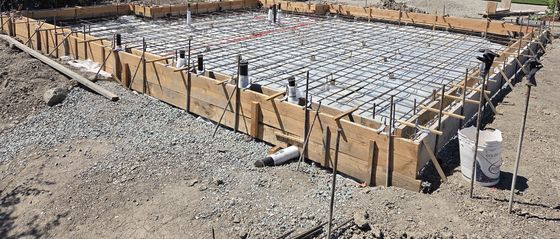
Field engineering: a formed slab with its rebar mat, forms, and stakes before the concrete pour

Engineering Services

Field engineering and contract review from cadwork California

Open the Engineering Services page ›
Image

News

Updates about Lexo and application examples
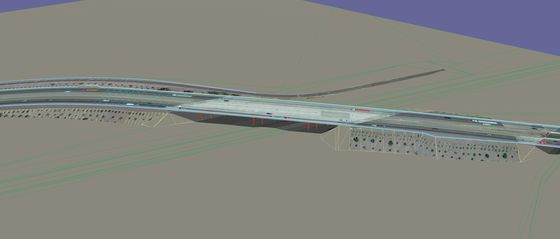
Merced 99 corridor model in Lexo, aerial view along SR 99

Roads, Highways, and Rail

Corridor models from cadwork Engineer, taken into 4D/5D construction with Lexo

Open the Roads, Highways & Rail page ›

Lexo tutorials

One walkthrough for commercial building work and one for roadway and rail work.

Commercial building

Introduction to Lexo basics: navigation, activating elements and the menus – the starting point for building models and takeoffs.

Watch the tutorial ›

Video in German.

Roadway and rail

Earthwork for corridor jobs: modeling the existing terrain, then cutting excavation into it with computed quantities.

Terrain tutorial ›Excavation tutorial ›

Videos in German. For a corridor walkthrough, contact cadwork California.

Renowned business leaders trust Lexocad:

Client 1
Client 2
Client 3
Client 5
Client 4
Client 6
Client 1
Client 2
Client 3
Client 4
Client 6
Client 5

Lexocad for Road, Highway & Rail Construction

Lexocad is the 5D construction tool in the cadwork family. Engineers design the transportation corridor in cadwork Engineer; the design refreshes live in Lexocad, which takes it into construction.

Design in cadwork Engineer

Corridor design – alignments, profiles and cross sections – is authored in cadwork Engineer, transportation-corridor BIM software cadwork has developed since 2004. Paired with Lexocad, the workflow reaches past sitework into regional planning.

Build with Lexocad (4D / 5D)

  • Cut the live-refreshed corridor into the existing terrain
  • Plan and quantify excavation
  • Plan the site installation
  • Automatic quantity takeoff through the component catalog
  • 4D construction stages for sequence planning (top license tier)
  • Import / export IFC, PDF, DXF, DWG and OBJ

Open BIM with IFC

  • IFC-based data model: every element is an IFC entity with spatial structure, property sets and GUIDs
  • Projects are saved in Lexocad’s own .lxz format; IFC models are exchanged as .ifc / .ifczip – imported, analyzed, edited and exported
  • buildingSMART-certified IFC2x3 import (Coordination View 2.0)
  • Export to IFC2x3 or IFC4
  • Element types include the newer IFC 4x3 infrastructure types
  • Large models can be imported as a memory-efficient SuperBloc

Custom Python tools built by AI agents

Lexocad 31 includes an MCP Connector (Extra › Python › MCP Connector). It runs locally and registers itself with Claude Desktop, so Claude can read the API docs for OpenLexocad, Lexocad’s public Python API, write a script and run it on the open model in one conversation. Typical tools:

  • IFC models: import and summarize by IFC type and spatial structure, check and reclassify types and properties, export IFC2x3, IFC4 or OBJ
  • Project-specific takeoff and quantity reports
  • Batch checks: IFC types, properties, naming, clashes
  • Input dialogs for repeated modeling steps
  • Batch IFC / OBJ exports run without opening the interface
  • A proven script saved to the user-defined menu for the whole team

Built in under Extra › Python: a Python Console, user-defined and default script menus, a library of example scripts (elements, geometry, Boolean operations, topology, document queries, BIM / IFC, file import & export, custom dialogs and standalone headless runs), additional Python modules you can install, such as reporting or data libraries, and API documentation linked from the menu.

Review AI-generated scripts and test them on a copy of the model before using them on production models.

Buying a Lexocad license

Lexocad comes in three packages: lexocad free, lexocad basic and lexocad pro. cadwork California is represented by Palo Alto Data Group (PADG).

1. Start with lexocad free

Test Lexocad for an unlimited time before you buy.

Download “lexocad free”

2. Request a quote for basic or pro

Email or call PADG with:

  • Your organization
  • Number of seats
  • The features you need (4D construction staging is in the top license tier)
Email for a quote

Or call +1 (408) 475-6450, Mon–Fri 8:00 A.M.–1:00 P.M. and 2:00–5:00 P.M.